Building a live-source lead generation agent with the OpenAI Agents SDK and Zenrows
A four-tool architecture that reads a bot-protected directory, enriches each company from its own site, and scores it against your ICP.

This article was originally published on the Zenrows blog.
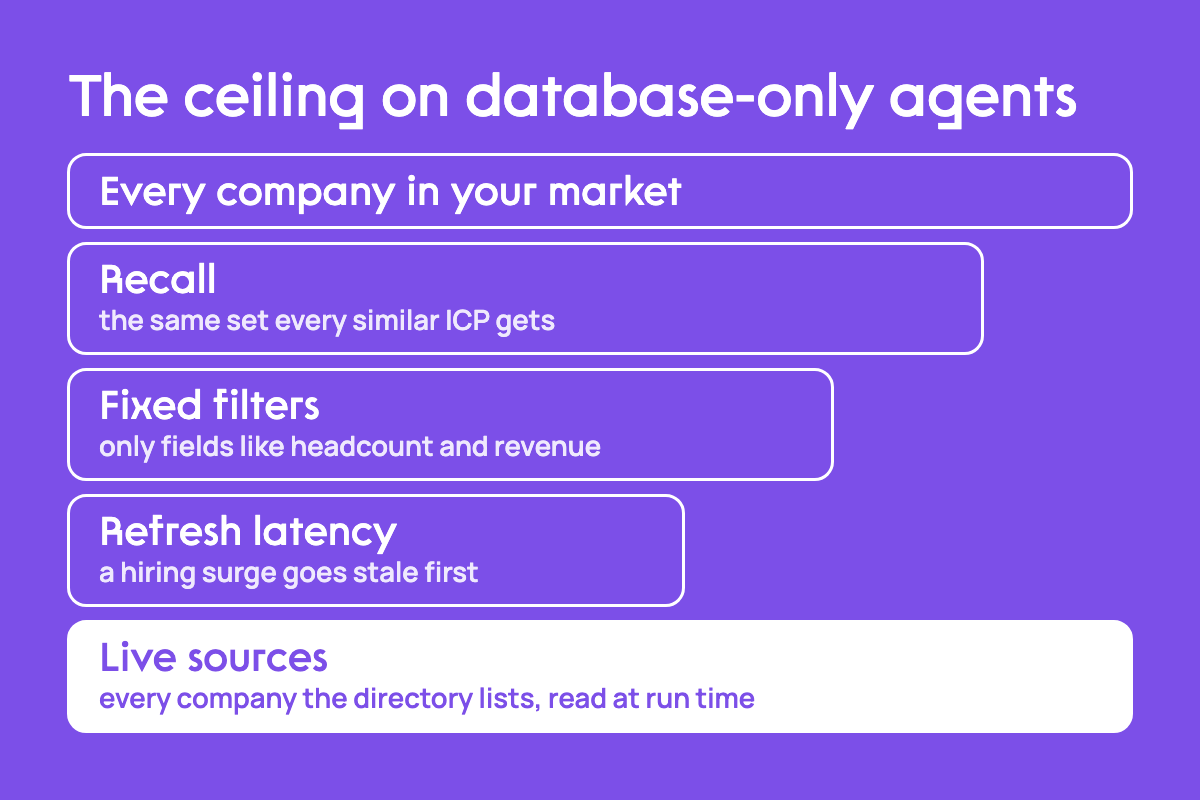
A lead generation agent built on a commercial database can only rank what that provider has already indexed. You can refine the scoring prompt and tighten the qualification criteria, and the candidate set stays the one every other agent with a similar ICP receives. The ceiling sits in the data source, so better prompting can't lift it.
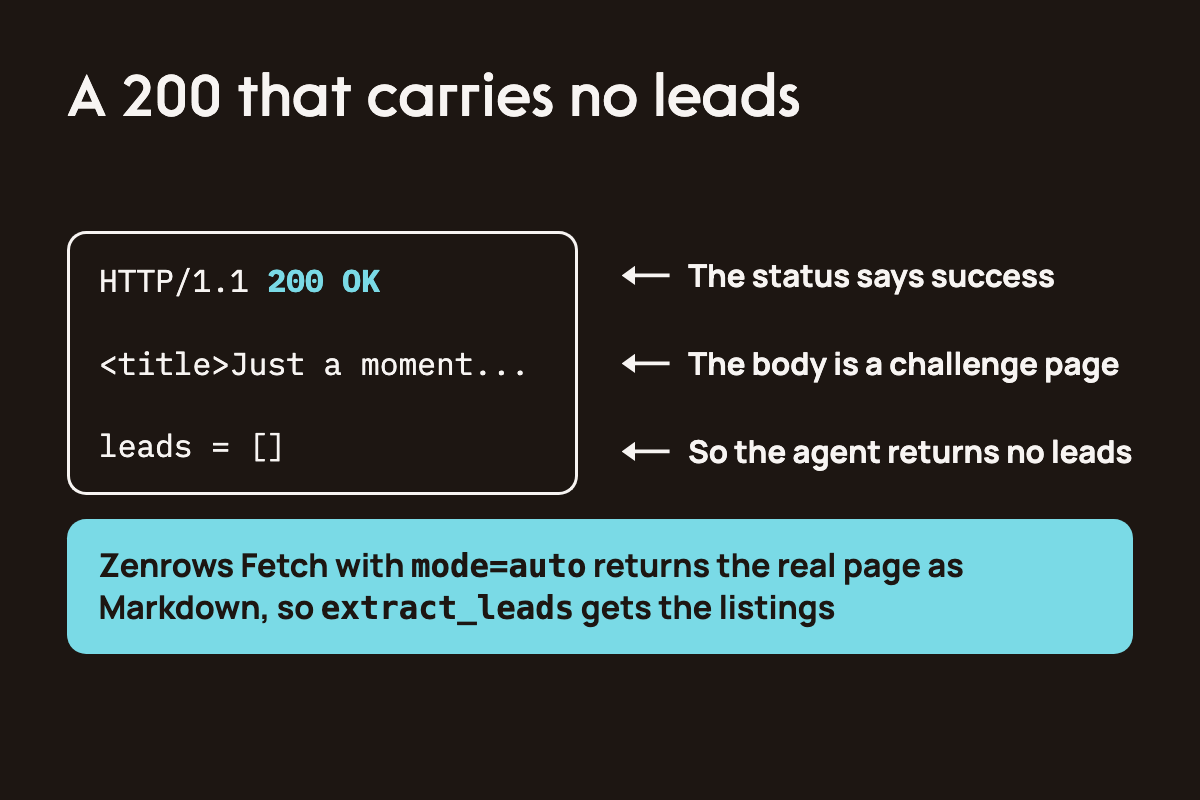
Live sources remove that ceiling. Niche directories, industry-specific listings, and regional business registries surface companies that commercial databases miss. They also introduce an access problem, because many of them sit behind bot protection such as Akamai, Cloudflare, or DataDome. A blocked fetch often looks identical to a successful one, so the agent returns an empty lead list and reports success.
This guide builds an agent that resolves both problems at the system level. Zenrows Fetch with mode=auto handles protected access in one call and returns Markdown. The OpenAI Agents SDK runs the loop. Four tools split the work so that bulky page content never travels through the model's context. You'll implement the following components:
A fetch tool that returns failures as instructions the model can act on.
A chunked extraction tool that turns a 543,637-character directory page into 78 structured leads.
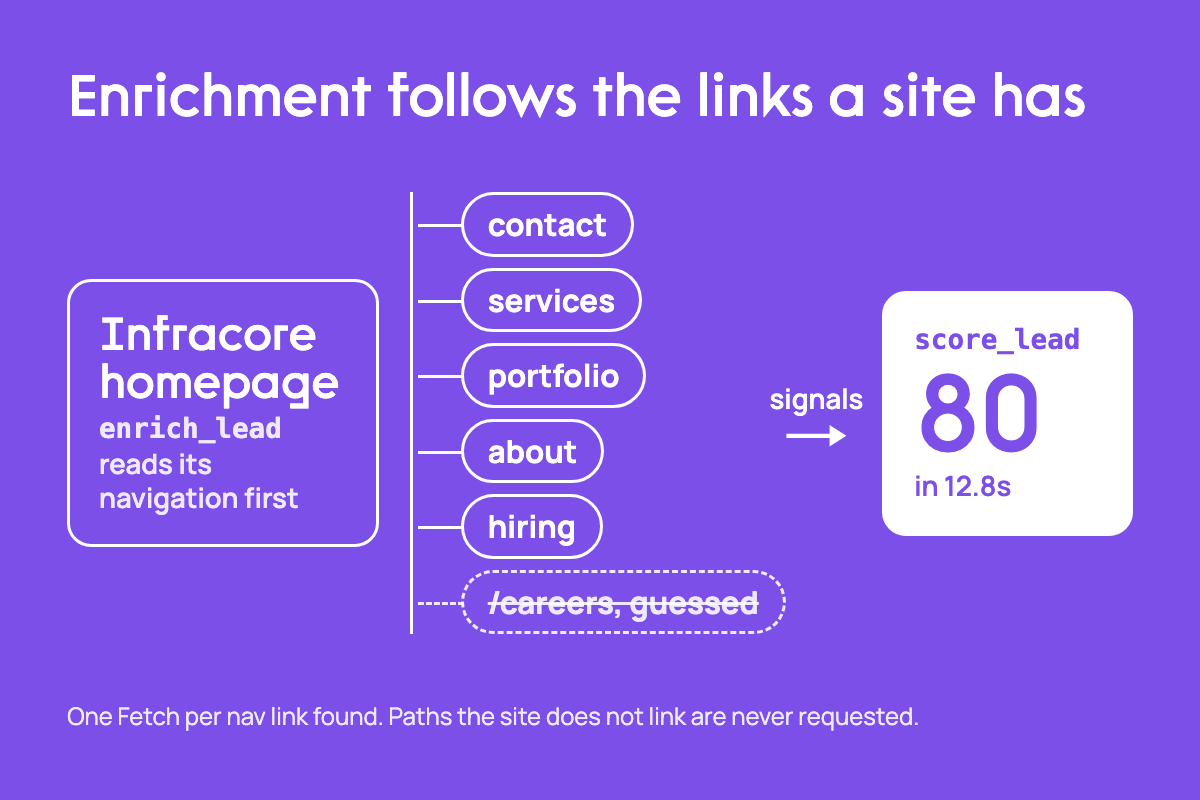
An enrichment tool that reads each company's own navigation and fetches only the pages it exposes.
A scoring tool that grades each lead against a plain-language ICP using only the evidence it receives.
A Batch extension that fetches many directory pages as one managed job.
The complete code is on GitHub.
Why database-only lead agents hit a ceiling
A database-only agent inherits three constraints from its provider.
Recall is capped. The dataset is a snapshot of the provider's corpus, so two agents running against it with similar ICPs produce the same candidate set. You can refine the scoring logic, but you can't out-prompt a source constraint when the provider decides recall.
Filters are fixed. Indexed datasets overrepresent companies with structured digital data and underrepresent niche businesses and operators. Even for companies that are represented, you can only filter on defined fields like headcount and revenue. Anything the dataset doesn't capture never enters your pipeline.
Data goes stale. A company's headcount stays stable for months, but a hiring surge or funding event opens a sales window that lasts weeks. By the time an indexed dataset catches the change, the signal is stale and someone else has already made contact.
How this works
The system has two layers. The agent layer decides what to do next, and the tool layer does the work. The agent receives a source URL and an ICP, discovers leads from the source, qualifies each lead, and returns ranked JSON. Everything that touches the network or reads a full page happens inside a tool.
Live sources trade the recall problem for an access problem, and that access problem fails silently. Protected sites block standard HTTP clients and headless browsers, and they rarely return an error when they do. A Cloudflare-protected page can return a 200 status code with a challenge page in the body. Your agent reads that challenge as valid content and extracts zero leads from it. Zenrows Fetch with mode=auto returns the rendered page in a single call, at a 99.9 percent average workflow success rate.
The tool layer splits into four jobs.
| Tool | Input | Output | Why it's separate |
|---|---|---|---|
fetch_page |
a URL | the page as Markdown | It's the only job that touches the network, so retries and errors live in one place |
extract_leads |
Markdown plus the source URL | Lead records |
it runs in chunks because a full directory page exceeds one reliable extraction call |
enrich_lead |
a company and its domain | enrichment signals from the company's site | it makes one fetch per nav link, so it drives the cost and is worth isolating |
score_lead |
enriched lead plus the ICP | a score from 0 to 100 with reasoning | It's pure reasoning with no network calls, so you can rerun it without re-fetching |
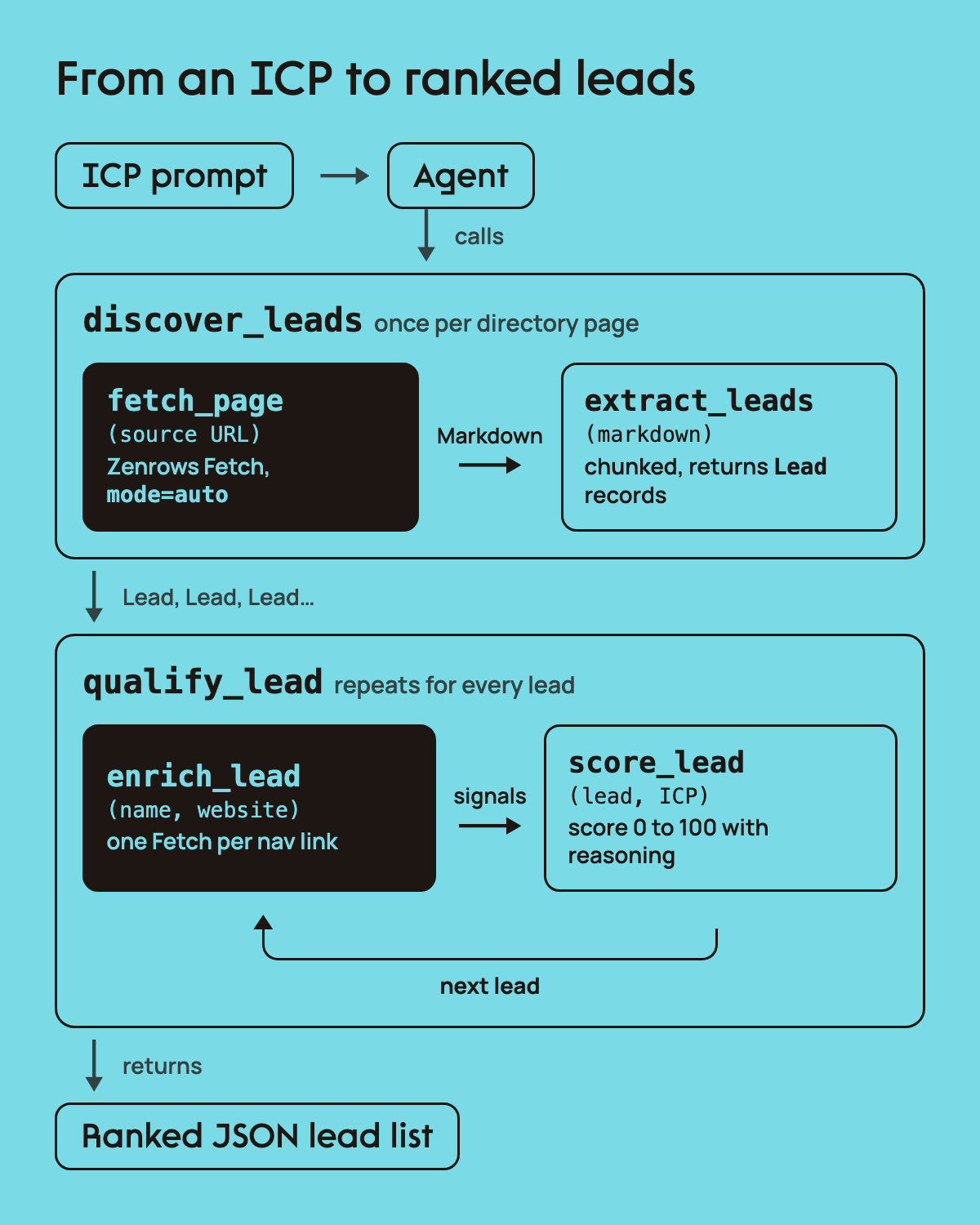
Separating the jobs keeps retries local. When enrichment fails on one lead, the agent retries that tool and the rest of the run continues. The agent itself only sees two composed tools. discover_leads runs fetch_page and extract_leads, and qualify_lead runs enrich_lead and score_lead. This composition is the most important design decision in the system, and the sections below explain why.
Prerequisites
Before you start, make sure you have the following:
Python 3.10 or above installed on your machine.
An OpenAI API key from your OpenAI developer dashboard, which the agent, the extraction tool, and the scoring tool all use.
A Zenrows API key from the signup page, which retrieves the full contents of web pages.
Install the OpenAI Agents SDK, requests for the Zenrows calls, pydantic for the tool schemas, and python-dotenv to load your keys.
python3 -m pip install openai-agents openai requests pydantic python-dotenv
Create a .env file in your project root with your OPENAI_API_KEY and ZENROWS_API_KEY. Add .env to .gitignore so the credentials never reach version control.
Building the Zenrows Fetch tool
Every code block in the next four sections lives in one file called tools.py. Append each block to the same file.
# tools.py, part 1 of 4
# configuration, the fetch tool, and the constants extraction needs.
# every network call in the system goes through _fetch_page, so retry
# behaviour and error reporting are defined exactly once

import os
import re
import requests
from urllib.parse import urlparse, parse_qs, unquote

from agents import function_tool
from dotenv import load_dotenv
from openai import OpenAI
from pydantic import BaseModel

load_dotenv()

ZENROWS_API_KEY = os.getenv("ZENROWS_API_KEY")
ZENROWS_ENDPOINT = "https://api.zenrows.com/v1/"

if not ZENROWS_API_KEY:
    raise RuntimeError("set ZENROWS_API_KEY in your .env file")

client = OpenAI()

# ===========================================================================
# job 1: fetch a page, protected or not
# ===========================================================================

def _fetch_page(url: str) -> str:
    """fetch logic, importable and testable without the agent."""
    params = {
        "url": url,
        "apikey": ZENROWS_API_KEY,
        "mode": "auto",              # start cheap, escalate only when the target needs it
        # markdown strips nav and boilerplate before the model reads it
        "response_type": "markdown"
    }

    try:
        response = requests.get(ZENROWS_ENDPOINT, params=params, timeout=90)
        response.raise_for_status()
    # return failures as text instead of raising, so one bad url does not end the run.
    # each message tells the model whether the failure is worth retrying
    except requests.exceptions.Timeout:
        return "FETCH_ERROR: timed out after 90s. retry once, then move on."
    except requests.exceptions.HTTPError as exc:
        status = exc.response.status_code
        if status in (401, 403):
            return f"FETCH_ERROR: {status}. api key rejected, do not retry."
        if status == 429:
            return "FETCH_ERROR: 429 concurrency limit. wait, then retry."
        if status in (400, 404):
            return f"FETCH_ERROR: {status}. this url is not retrievable, do not retry."
        return f"FETCH_ERROR: {status}. retry once, then report the failure."
    except requests.exceptions.RequestException as exc:
        return f"FETCH_ERROR: {exc}. do not retry."

    content = response.text.strip()
    if not content:
        return "FETCH_ERROR: empty response body. do not retry."

    return content

# the decorator replaces the function with a FunctionTool object, which is not
# callable. keeping the logic in _fetch_page above leaves it testable
@function_tool
def fetch_page(url: str) -> str:
    """Fetch any web page as markdown, including pages behind anti-bot protection.

    Args:
        url: full url of the page to fetch
    """
    return _fetch_page(url)

# ===========================================================================
# job 2: turn a directory page into leads
# ===========================================================================

# matches the tracking links directories wrap around outbound urls
REDIRECT_LINK = re.compile(r"https?://[a-z0-9.-]*/redirect\?[^\s\)\"]+")

# a full directory page is too long for one reliable extraction call
CHUNK_SIZE = 40000

# slices cut mid-listing, and the extraction prompt is told to skip partial
# entries, so a listing straddling a boundary is dropped by both slices.
# overlapping the window carries each boundary listing whole into one of them;
# _key dedupes the entries the overlap sees twice
CHUNK_OVERLAP = 2000
Why this approach
The fetch tool returns failures as text strings and never raises. An exception would end the whole run on one bad URL. A string ends only that call, and because each message names the failure and says whether to retry, the model can make that decision itself. A 401 tells it to stop, a 429 tells it to wait, and a timeout tells it to try once more.
mode=auto moves the access decision to Zenrows. Simple pages resolve on the lightest path, and only protected targets escalate, so you never hand-tune proxies or rendering per site. response_type=markdown strips navigation and boilerplate before the model reads the page. If your source is an API-like endpoint, use response_type=json and skip the conversion.
The split between _fetch_page and fetch_page exists for testing. @function_tool replaces the function with a FunctionTool object that you can't call directly. Keeping the logic in a plain function means other tools and your test scripts can call it without the agent.
Extracting the leads
The Markdown from fetch_page goes to the extraction layer, which turns it into structured records.
# tools.py, part 2 of 4
# extraction. a directory page is far too long for one structured-output
# call, so the page is cleaned, chunked with overlap, extracted per chunk,
# and deduplicated. discover_leads composes fetch and extract so the raw
# page never enters the agent's context

# strict tool schemas reject bare dicts, so every tool input and output is a model
class Lead(BaseModel):
    company: str
    name: str
    website: str
    source_url: str

class LeadList(BaseModel):
    leads: list[Lead]

def _unwrap_redirects(markdown: str) -> str:
    """rewrite directory tracking links to the destination domain."""
    def replace(match):
        url = match.group(0)
        # the real destination sits url-encoded in the u parameter
        target = parse_qs(urlparse(url).query).get("u", [""])[0]
        if not target:
            return url
        parsed = urlparse(unquote(target))
        return f"{parsed.scheme}://{parsed.netloc}"

    return REDIRECT_LINK.sub(replace, markdown)

def _reject_source_domain(leads: list[dict], source_url: str) -> list[dict]:
    """blank any website that points back at the directory itself."""
    directory = urlparse(source_url).netloc.replace("www.", "")
    for lead in leads:
        host = urlparse(lead["website"]).netloc.replace("www.", "")
        if host == directory:
            lead["website"] = ""
    return leads

def _key(lead: dict) -> str:
    """stable identity for dedupe across chunks."""
    # the model returns the same domain with and without www, so normalise before comparing
    site = lead["website"].lower()
    for prefix in ("https://", "http://", "www."):
        site = site.replace(prefix, "")
    site = site.rstrip("/")
    # fall back to company name so leads without a domain are not collapsed into one
    return site or lead["company"].strip().lower()

def _extract_chunk(chunk: str, source_url: str) -> list[dict]:
    """run one extraction call over a slice of the page."""
    response = client.responses.parse(
        model="gpt-4o-mini",
        max_output_tokens=8000,
        input=[
            {
                "role": "system",
                "content": (
                    "extract every company listed in this page fragment. "
                    "website is the company's own domain, taken from that listing's "
                    "visit website link. "
                    "never use a link from the directory's own domain as the website. "
                    "name is a person's name and is usually absent from a directory "
                    "listing, so leave it empty unless a person is actually named. "
                    "use an empty string for any field the fragment does not state, "
                    "and never invent a value. "
                    "the fragment may start or end mid listing, so skip any partial entry."
                )
            },
            {
                "role": "user",
                "content": f"source_url: {source_url}\n\n{chunk}"
            }
        ],
        text_format=LeadList
    )
    return [lead.model_dump() for lead in response.output_parsed.leads]

def _extract_leads(content: str, source_url: str) -> list[dict]:
    """parse markdown into lead dicts, chunking long pages."""
    # a fetch failure is a string, not a page. parsing it would return an empty
    # list that looks identical to a genuinely empty directory
    if content.startswith("FETCH_ERROR"):
        return []

    # resolve tracking links before the model reads them
    content = _unwrap_redirects(content)

    leads, seen = [], set()
    for start in range(0, len(content), CHUNK_SIZE - CHUNK_OVERLAP):
        chunk = content[start:start + CHUNK_SIZE]
        for lead in _extract_chunk(chunk, source_url):
            key = _key(lead)
            if key in seen:
                continue
            seen.add(key)
            leads.append(lead)

    return _reject_source_domain(leads, source_url)

@function_tool
def extract_leads(content: str, source_url: str) -> list[Lead]:
    """Parse a fetched page into a list of leads.

    Args:
        content: markdown returned by fetch_page
        source_url: url the content came from, recorded on every lead
    """
    return [Lead(**lead) for lead in _extract_leads(content, source_url)]

# fetch and extract are one job from the agent's point of view. exposing them
# separately means the whole page passes through the model's context to get
# from one tool to the next, which overflows the window on a large directory
@function_tool
def discover_leads(source_url: str) -> list[Lead]:
    """Fetch a directory page and return the companies listed on it.

    Args:
        source_url: url of the directory or listing page
    """
    markdown = _fetch_page(source_url)
    if markdown.startswith("FETCH_ERROR"):
        return []
    return [Lead(**lead) for lead in _extract_leads(markdown, source_url)]

# ===========================================================================
# job 3: enrich each lead from its own website
# ===========================================================================
The extraction pipeline
Four decisions shape this layer.
Use schemas everywhere. Strict tool schemas reject bare dicts, so every tool input and output is a Pydantic model.
Clean before reading.
_unwrap_redirectsrewrites the directory's tracking links to each company's own domain before the model sees them. In the test run, that removed 85,990 characters of noise._reject_source_domainthen blanks any website that still points back at the directory.Chunk with overlap.
_extract_leadsreads the page in 40,000-character windows with a 2,000-character overlap. The extraction prompt skips partial listings, so a listing cut by a chunk boundary would vanish from both chunks. The overlap carries it whole into one of them, and_keyremoves the duplicate.Compose at the tool boundary.
discover_leadsfetches and extracts in one call. Exposing the two tools separately would force the whole page through the model's context on its way between them, and that overflows the window on a large directory.
Testing fetch and extraction
Test both jobs before the agent exists. Save this script as test_fetch_extract.py. It caches the fetched page, so you can tune extraction without paying for a new fetch each time.
# test_fetch_extract.py
import json
import os
from tools import _fetch_page, _unwrap_redirects, _extract_leads

SOURCE_URL = "https://clutch.co/it-services"
FIXTURE = "fixtures/directory_page.md"
LEADS_CACHE = "fixtures/leads.json"

# ---- job 1: fetch ---------------------------------------------------------
# cache the page so extraction can be tuned without paying for a fetch each time
if os.path.exists(FIXTURE):
    with open(FIXTURE) as f:
        markdown = f.read()
    print(f"using cached page, {len(markdown)} chars")
else:
    markdown = _fetch_page(SOURCE_URL)
    if markdown.startswith("FETCH_ERROR"):
        raise SystemExit(markdown)
    os.makedirs("fixtures", exist_ok=True)
    with open(FIXTURE, "w") as f:
        f.write(markdown)
    print(f"fetched and cached, {len(markdown)} chars")

unwrapped = _unwrap_redirects(markdown)
print(f"{len(unwrapped)} chars after unwrapping redirects, "
      f"{len(markdown) - len(unwrapped)} saved\n")

# ---- job 2: extract -------------------------------------------------------
leads = _extract_leads(markdown, SOURCE_URL)

with open(LEADS_CACHE, "w") as f:
    json.dump(leads, f, indent=2)

print(f"{len(leads)} leads extracted\n")
for lead in leads[:5]:
    print(f"{lead['company']:<32} {lead['website'] or '(none)'}")

missing_site = sum(1 for lead in leads if not lead["website"])
print(f"\n{missing_site} of {len(leads)} leads have no website")
Run it from the project root.
python3 test_fetch_extract.py
Here's the output from a local run against an IT services directory.
using cached page, 543637 chars
457647 chars after unwrapping redirects, 85990 saved

78 leads extracted

Infracore                        https://infracore.net
Miles IT                         https://www.milesit.com
Geniusee                         https://geniusee.com
Peeklogic, LLC                   https://www.peeklogic.com
TechQuarter LLC                  https://www.techquarter.io

0 of 78 leads have no website
Counts vary between runs because directory pages change and the model can read the same page differently.
Building the enrichment and scoring tools
An extracted lead carries only a company name and a domain, which isn't enough to judge fit. Lead enrichment fills that gap, and this agent runs it against each company's own website. The signals that decide fit live there: hiring pages, services pages, case studies, and contact pages.
# tools.py, part 3 of 4
# enrichment. the homepage nav tells us which pages exist, so the tool
# follows those links and never guesses paths. a guessed /careers that
# 404s still costs a fetch, and enrichment is already the cost driver

# matches any markdown link, used to read a company's own navigation
MARKDOWN_LINK = re.compile(r"\[([^\]]+)\]\((https?://[^\s\)]+)\)")

# guessing paths costs a fetch per miss, so read the site's nav instead and
# follow only the links it actually has
SIGNAL_KEYWORDS = {
    "hiring": ["career", "job", "join", "hiring", "work with us", "we are hiring"],
    "services": ["service", "what we do", "solutions", "expertise", "capabilities"],
    "portfolio": ["portfolio", "case stud", "our work", "projects", "clients"],
    "about": ["about", "who we are", "our story", "team"],
    "contact": ["contact", "get in touch", "book a call", "let's talk", "talk to us"],
}

# dict[str, X] is rejected by strict schemas too, which is why signals is a list
class Signal(BaseModel):
    name: str
    found: bool
    url: str
    excerpt: str

class EnrichedLead(BaseModel):
    company: str
    website: str
    signals: list[Signal]

def _discover_links(markdown: str, website: str) -> dict:
    """find real urls for each signal by reading the homepage nav."""
    host = urlparse(website).netloc.replace("www.", "")
    homepage_path = urlparse(website).path.rstrip("/") or "/"
    found = {}

    for text, url in MARKDOWN_LINK.findall(markdown):
        parsed = urlparse(url)

        # only follow links on the company's own domain
        if parsed.netloc.replace("www.", "") != host:
            continue

        # an anchor on the homepage is content already in the homepage excerpt
        if parsed.fragment and (parsed.path.rstrip("/") or "/") == homepage_path:
            continue

        # drop the fragment, it never changes what the server returns
        clean_url = f"{parsed.scheme}://{parsed.netloc}{parsed.path}"

        haystack = f"{text} {url}".lower()
        for signal, keywords in SIGNAL_KEYWORDS.items():
            if signal not in found and any(k in haystack for k in keywords):
                found[signal] = clean_url

    return found

def _enrich_lead(company: str, website: str) -> EnrichedLead:
    """collect signals from the company's own site."""
    # a lead with no domain still flows through to scoring, judged on what little is known
    if not website:
        return EnrichedLead(company=company, website="", signals=[])

    homepage = _fetch_page(website)
    if homepage.startswith("FETCH_ERROR"):
        return EnrichedLead(company=company, website=website, signals=[])

    # the homepage is the most informative single page, and on a one-page site
    # it holds everything the nav links point at
    signals = [Signal(name="homepage", found=True, url=website, excerpt=homepage[:6000])]

    for name, url in _discover_links(homepage, website).items():
        content = _fetch_page(url)
        ok = not content.startswith("FETCH_ERROR")
        signals.append(Signal(
            name=name,
            found=ok,
            url=url,
            # keep excerpts small, scoring reads all of them in one call
            excerpt=content[:2000] if ok else ""
        ))

    return EnrichedLead(company=company, website=website, signals=signals)

@function_tool
def enrich_lead(company: str, website: str) -> EnrichedLead:
    """Collect signals from a company's own website.

    Args:
        company: company name from the directory listing
        website: company's own domain
    """
    return _enrich_lead(company, website)

# ===========================================================================
# job 4: score each lead against the icp
# ===========================================================================
Why enrichment reads the navigation
Guessing paths like /careers or /case-studies costs a fetch for every miss, and naming conventions vary across sites. _discover_links reads the homepage Markdown, keeps only links on the company's own domain, and matches link text and URLs against keyword groups for each signal. Homepage anchors are skipped because their content already sits in the homepage excerpt.
Zenrows Fetch does the job of a lead enrichment API here, and the signals come from the live site. Excerpts are capped at 6,000 characters for the homepage and 2,000 for each linked page, because scoring reads every excerpt in one call.
Markdown suits this design because the model does the reading. If you'd prefer structured fields, Zenrows Extract returns JSON without a selector map.
Scoring against the ICP
# tools.py, part 4 of 4
# scoring. no network calls happen here, so a scoring change can be
# re-run against cached enrichment. qualify_lead composes enrich and
# score for the same context-window reason discover_leads exists

class Score(BaseModel):
    score: int
    reasoning: str

class ScoredLead(BaseModel):
    company: str
    website: str
    score: int
    reasoning: str

def _score_lead(lead: EnrichedLead, icp: str) -> ScoredLead:
    """score an enriched lead against the icp description."""
    # no fetching happens here. every page was already retrieved in job 3
    summary = "\n\n".join(
        f"{s.name} page: {'found at ' + s.url if s.found else 'not found'}\n{s.excerpt}"
        for s in lead.signals
    )

    response = client.responses.parse(
        model="gpt-4o-mini",
        max_output_tokens=500,
        input=[
            {
                "role": "system",
                "content": (
                    "score how well this company matches the ideal customer profile. "
                    "return an integer from 0 to 100 and one sentence of reasoning. "
                    "base the score only on evidence in the signals provided. "
                    "a missing page is weak evidence, not disqualifying. "
                    "if the signals are too thin to judge, score below 30 and say so."
                )
            },
            {
                "role": "user",
                "content": (
                    f"ideal customer profile:\n{icp}\n\n"
                    f"company: {lead.company}\n"
                    f"website: {lead.website}\n\n"
                    f"signals:\n{summary}"
                )
            }
        ],
        text_format=Score
    )

    return ScoredLead(
        company=lead.company,
        website=lead.website,
        score=response.output_parsed.score,
        reasoning=response.output_parsed.reasoning
    )

@function_tool
def score_lead(lead: EnrichedLead, icp: str) -> ScoredLead:
    """Score an enriched lead against an ICP description.

    Args:
        lead: enriched lead returned by enrich_lead
        icp: plain-language description of the ideal customer
    """
    return _score_lead(lead, icp)

# an EnrichedLead carries page excerpts the model has no reason to read. passing
# it between two tools means the agent has to reproduce all of it as an argument,
# and it summarises instead, so scoring reads a summary rather than the pages
@function_tool
def qualify_lead(company: str, website: str, icp: str) -> ScoredLead:
    """Enrich a lead from its own website and score it against an ICP.

    Args:
        company: company name from the directory listing
        website: company's own domain
        icp: plain-language description of the ideal customer
    """
    enriched = _enrich_lead(company, website)
    return _score_lead(enriched, icp)
score_lead reads the signals alongside the ICP and returns a score from 0 to 100 with one sentence of reasoning. The system prompt binds the score to evidence. A missing page counts as weak evidence, and thin signals force a score below 30, so a lead with only a domain lands below one with a careers page and named case studies.
qualify_lead exists for the same reason as discover_leads. An EnrichedLead carries page excerpts the agent has no reason to read. If the agent passed one between two tools, it would need to reproduce every excerpt as an argument, and in practice it summarises them, which means scoring would grade a summary. Composing the two calls keeps the full evidence inside Python.
Testing enrichment and scoring
Run both halves before you wire the agent, so any later failure belongs to the agent loop. Save this script as test_enrich_score.py.
# test_enrich_score.py

import json
import os
import time
from tools import _fetch_page, _unwrap_redirects, _extract_leads, _enrich_lead, _score_lead

SOURCE_URL = "https://clutch.co/it-services"
FIXTURE = "fixtures/directory_page.md"
LEADS_CACHE = "fixtures/leads.json"

ICP = (
    "IT services agencies that build custom software for B2B clients, "
    "publish detailed case studies with named clients, and offer ai and cloud services"
)

# ---- job 1: fetch ---------------------------------------------------------
if os.path.exists(FIXTURE):
    with open(FIXTURE) as f:
        markdown = f.read()
    print(f"using cached page, {len(markdown)} chars")
else:
    markdown = _fetch_page(SOURCE_URL)
    if markdown.startswith("FETCH_ERROR"):
        raise SystemExit(markdown)
    os.makedirs("fixtures", exist_ok=True)
    with open(FIXTURE, "w") as f:
        f.write(markdown)
    print(f"fetched and cached, {len(markdown)} chars")

unwrapped = _unwrap_redirects(markdown)
print(f"{len(unwrapped)} chars after unwrapping redirects, "
      f"{len(markdown) - len(unwrapped)} saved\n")

# ---- job 2: extract -------------------------------------------------------
if os.path.exists(LEADS_CACHE):
    with open(LEADS_CACHE) as f:
        leads = json.load(f)
    print(f"using {len(leads)} cached leads\n")
else:
    leads = _extract_leads(markdown, SOURCE_URL)
    with open(LEADS_CACHE, "w") as f:
        json.dump(leads, f, indent=2)
    print(f"{len(leads)} leads extracted\n")

for lead in leads[:5]:
    print(f"{lead['company']:<32} {lead['website'] or '(none)'}")

missing_site = sum(1 for lead in leads if not lead["website"])
print(f"\n{missing_site} of {len(leads)} leads have no website\n")
print("-" * 60 + "\n")

# ---- jobs 3 and 4: enrich and score ---------------------------------------
# enrichment is one fetch per nav link found, so start with a few leads
sample = [lead for lead in leads if lead["website"]][:3]

for lead in sample:
    start = time.time()
    enriched = _enrich_lead(lead["company"], lead["website"])
    elapsed = time.time() - start

    found = [s.name for s in enriched.signals if s.found]
    print(f"{enriched.company}  ({elapsed:.1f}s)")
    print(f"  found: {', '.join(found) if found else 'nothing'}")

    scored = _score_lead(enriched, ICP)
    print(f"  score: {scored.score}")
    print(f"  {scored.reasoning}\n")
Run it.
python3 test_enrich_score.py
Here are the first two leads from the output.
Infracore  (12.8s)
  found: homepage, contact, services, portfolio, about, hiring
  score: 80
  Infracore fits well within the ideal customer profile as they offer IT services, including cloud solutions and have case studies showcasing customized work for various industries, but they may lack detailed named client presentations.

Miles IT  (12.1s)
  found: homepage, contact, about, services, portfolio, hiring
  score: 75
  Miles IT provides software development and AI services, aligning well with the ideal customer profile, but lacks detailed case studies with named clients which slightly diminishes the score.
Each lead took around 12 seconds to enrich and score. The signal list reflects what each site exposes in its navigation, so a lead with no careers page has no hiring signal.
Wiring the agent
Save the agent as agent.py.
# agent.py
# the agent gets two composed tools and a fixed sequence. planning is
# decided up front in INSTRUCTIONS, so a small model handles the loop
# and the judgment work stays inside score_lead

import asyncio

from agents import Agent, Runner, set_tracing_disabled

from tools import discover_leads, qualify_lead

set_tracing_disabled(True)

SOURCE_URL = "https://clutch.co/it-services"

ICP = (
    "IT services agencies that build custom software for B2B clients, "
    "publish detailed case studies with named clients, and offer ai and cloud services"
)

INSTRUCTIONS = """You find and qualify sales leads from web directories.

Follow this sequence exactly:

1. call discover_leads on the source url the user gives you
2. for each lead that has a website, call qualify_lead with its company, website,
   and the icp description from the user message
3. return the scored leads as a json array sorted by score descending

rules:
- process only the first 10 leads that have a website, then stop and return them
- skip leads with no website, they cannot be scored fairly
- if a tool returns a string starting with FETCH_ERROR, follow the instruction in
  that message. do not retry a call the message tells you not to retry
- never invent a lead, a website, or a score. every value comes from a tool result
"""

agent = Agent(
    name="lead generation agent",
    instructions=INSTRUCTIONS,
    model="gpt-4o-mini",  # the reasoning here is scoring, not planning
    tools=[discover_leads, qualify_lead],
)

async def main():
    result = await Runner.run(
        agent,
        input=f"source url: {SOURCE_URL}\n\nideal customer profile:\n{ICP}",
        max_turns=50,  # one qualify call per lead, plus discovery and the reply
    )

    # the trace shows which tools ran and in what order
    for item in result.new_items:
        if item.type == "tool_call_item":
            print(item.raw_item.name)

    print()
    print(result.final_output)

if __name__ == "__main__":
    asyncio.run(main())
The instructions make three guarantees. Each run stops after 10 leads with a website. Leads with no website are skipped because they can't be scored fairly. Every returned value must come from a tool result, which makes the tool-call trace the first thing to inspect when a run misbehaves.
Run the agent.
python3 agent.py
The agent prints the ranked leads as JSON. Here are the first two.
[
    {
        "company": "Geniusee",
        "website": "https://geniusee.com",
        "score": 85,
        "reasoning": "Geniusee offers a range of IT services including custom software development, AI solutions, and cloud services, which align closely with the ideal customer profile; however, the absence of detailed case studies with named clients slightly limits the fit."
    },
    {
        "company": "Sigli",
        "website": "https://www.sigli.com",
        "score": 85,
        "reasoning": "Sigli aligns closely with the ideal customer profile by offering custom software development for B2B clients, specializing in AI and cloud services, and publishing case studies, although the specificity of named clients could not be verified."
    }
]
Scaling with Batch
One directory page rarely produces enough leads to matter, and a directory usually spans many pages. Sending one Fetch call per page means you own the concurrency and the retries. Zenrows Batch takes the whole URL list as one managed job and handles the queue, concurrency, retries, and result delivery.
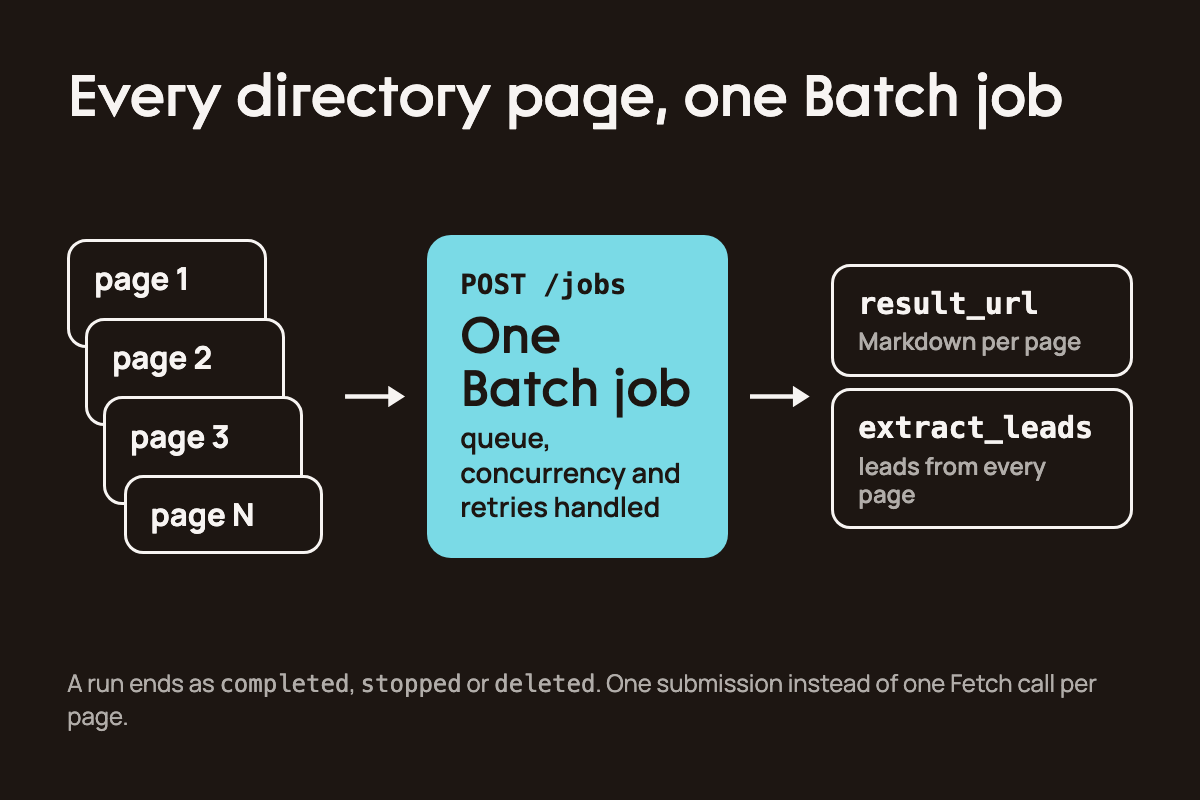
Save this script as batch.py.
# batch.py
# discover_leads_batch replaces discover_leads when the source spans
# many pages. extraction is reused unchanged, so only the fetch layer
# moves from one synchronous call to one asynchronous job

# batch.py
# Scale discovery across several directory pages with Zenrows Batch.
#
# One Fetch call retrieves one page. Batch takes the whole list as a single
# managed job and handles the queue, concurrency and retries, so a directory
# with many pages costs one submission instead of one call per page.

import time

import requests
from agents import function_tool

from tools import ZENROWS_API_KEY, Lead, _extract_leads

BATCH_ENDPOINT = "https://async.api.zenrows.com/v1/jobs"

# batch authenticates by header, unlike fetch which takes apikey as a query param
BATCH_HEADERS = {"X-API-Key": ZENROWS_API_KEY, "Content-Type": "application/json"}

# a job accepts up to 100,000 urls
MAX_URLS_PER_JOB = 100_000

def _submit_batch(urls: list[str]) -> str:
    """submit a url list as one job, return the job id."""
    if len(urls) > MAX_URLS_PER_JOB:
        raise ValueError(f"a job accepts at most {MAX_URLS_PER_JOB} urls")

    payload = {
        "type": "regular",
        "status": "closed",  # run once, accept no further tasks
        "zenrows_params": {"mode": "auto", "response_type": "markdown"},
        "tasks": [{"url": url} for url in urls],
    }
    response = requests.post(
        BATCH_ENDPOINT, headers=BATCH_HEADERS, json=payload, timeout=30
    )
    response.raise_for_status()
    return response.json()["job_id"]

def _collect_batch(job_id: str, max_attempts: int = 60) -> list[tuple[str, str]]:
    """wait for the job to reach a terminal state, then pull each task's markdown."""
    # terminal run states are completed, stopped and deleted. "failed" is a task
    # status, not a run status, so polling for it never returns
    for _ in range(max_attempts):
        time.sleep(5)
        status = requests.get(
            f"{BATCH_ENDPOINT}/{job_id}", headers=BATCH_HEADERS, timeout=30
        )
        status.raise_for_status()
        run = status.json()["latest_run"]
        if run["status"] in ("completed", "stopped", "deleted"):
            break
    else:
        raise TimeoutError(f"job {job_id} did not reach a terminal state in time")

    response = requests.get(
        f"{BATCH_ENDPOINT}/{job_id}/results", headers=BATCH_HEADERS, timeout=30
    )
    response.raise_for_status()

    pages = []
    for task in response.json()["results"]:
        if task["status"] != "successful":
            continue
        # result_url is presigned and valid for 2 hours; re-list the results for a
        # fresh link rather than storing this one
        markdown = requests.get(task["result_url"], timeout=60).text
        pages.append((task["url"], markdown))

    return pages

@function_tool
def discover_leads_batch(source_urls: list[str]) -> list[Lead]:
    """Fetch several directory pages as one job and return every company listed.

    Args:
        source_urls: directory or listing page urls to fetch
    """
    job_id = _submit_batch(source_urls)

    leads = []
    for url, markdown in _collect_batch(job_id):
        leads.extend(Lead(**lead) for lead in _extract_leads(markdown, url))

    return leads

if __name__ == "__main__":
    # two pages of the same directory, submitted as one job
    urls = [
        "https://clutch.co/it-services",
        "https://clutch.co/it-services?page=2",
    ]
    job_id = _submit_batch(urls)
    print(f"submitted {job_id}")

    for url, markdown in _collect_batch(job_id):
        print(f"{url}: {len(markdown)} chars")
A few details in this script are easy to get wrong.
Batch authenticates with an
X-API-Keyheader, while Fetch takes the key as a query parameter.The terminal run states are
completed,stopped, anddeleted. Afailedvalue only appears on individual tasks, so a poll that waits for it on the run never returns.Each
result_urlis presigned and valid for two hours. Re-list the results to get a fresh link when you need one later.A single job accepts up to 100,000 URLs.
You can also reach Batch through the Python SDK, the zenrows batch CLI, and the Zenrows MCP server, and none of them need the polling loop. This guide uses raw REST so every step of the tool stays explicit. For a full implementation guide, read running large-scale scraping jobs with Batch.
Conclusion
You now have an AI lead generation agent that reads a directory with Zenrows Fetch, pulls out every company listed, visits each company's domain, and scores the results against a plain-language ICP. The run in this guide pulled 78 companies off a single page, and agent.py scores the first 10 per run at under 20 seconds each.
That's automated lead generation with no vendor list underneath it. The agent reads the source, and the source is whichever directory your market uses.
Where to take this next
Run a full pass. Raise or remove the 10-lead cap in
INSTRUCTIONS.Add a review step. Put a human checkpoint between scoring and outreach, then push qualifying leads into a CRM such as HubSpot or Salesforce, an email sequencing tool, or a CSV export.
Productionise it. Wrap
agent.pyin an HTTP endpoint and trigger it as a webhook step from n8n, Zapier, or Power Automate, with the source URL and ICP in the request body.Swap the wrapper for MCP. The Zenrows MCP server exposes the same fetch capability to any MCP-compatible agent. This walkthrough of the MCP server covers the setup.
Change models. The Zenrows tools are plain Python functions, so the agent wrapper can use any model.
extract_leadsandscore_leaddepend on OpenAI's structured output API, so those two calls need replacing if you switch providers.
FAQ
How much does it cost to run this agent?
A standard Zenrows request costs one credit. mode=auto selects the configuration each target needs, and a page that requires the full configuration costs up to 25 credits. These weights stay fixed across all plans. In this guide, the directory page resolved at the standard rate, and enrichment drove the cost at five or six fetches per lead. A 10-lead run costs roughly 60 credits, and you only pay for successful requests. The Zenrows pricing documentation has the details.
Can the agent replace an SDR?
It replaces the discovery and qualification pass. Outreach stays with a person, and this guide stops at the handoff. The judgment calls, such as whether a score of 70 is worth an email and what that email says, belong to your sales team.
Does this agent work on LinkedIn?
You shouldn't point it at LinkedIn. LinkedIn's user agreement prohibits automated access, and enforcement can lead to account restrictions. Use sources that permit automated access, such as public directories, business registries, and review platforms.
About the author
A teacher, learner, data analyst, technical writer and content creator.
I would be creating contents on data analysis, open source while explaining concepts of random exploration that piqued my interest 😅.
Happy Learning and Coding!
Comments
Join the discussionNo comments yet. Be the first to comment.